Combine multiple messy CSV files into one — in one click.

Build the merge and cleanup steps once — deduplication, date fixes, pivots, column reshaping — then re-run on any new set of files in one click. No formulas, no code, nothing leaves your computer.

Free · Windows 10 & 11. Prefer a direct download? Get the installer (.zip)
4.5/5 · Softpedia editor review

"Automates the cleanup of your spreadsheets and saves you time and effort." — Softpedia

See it in action

Messy export → clean file → re-run on the next file in one click.

From mess to clean in three steps

1

Drop your file

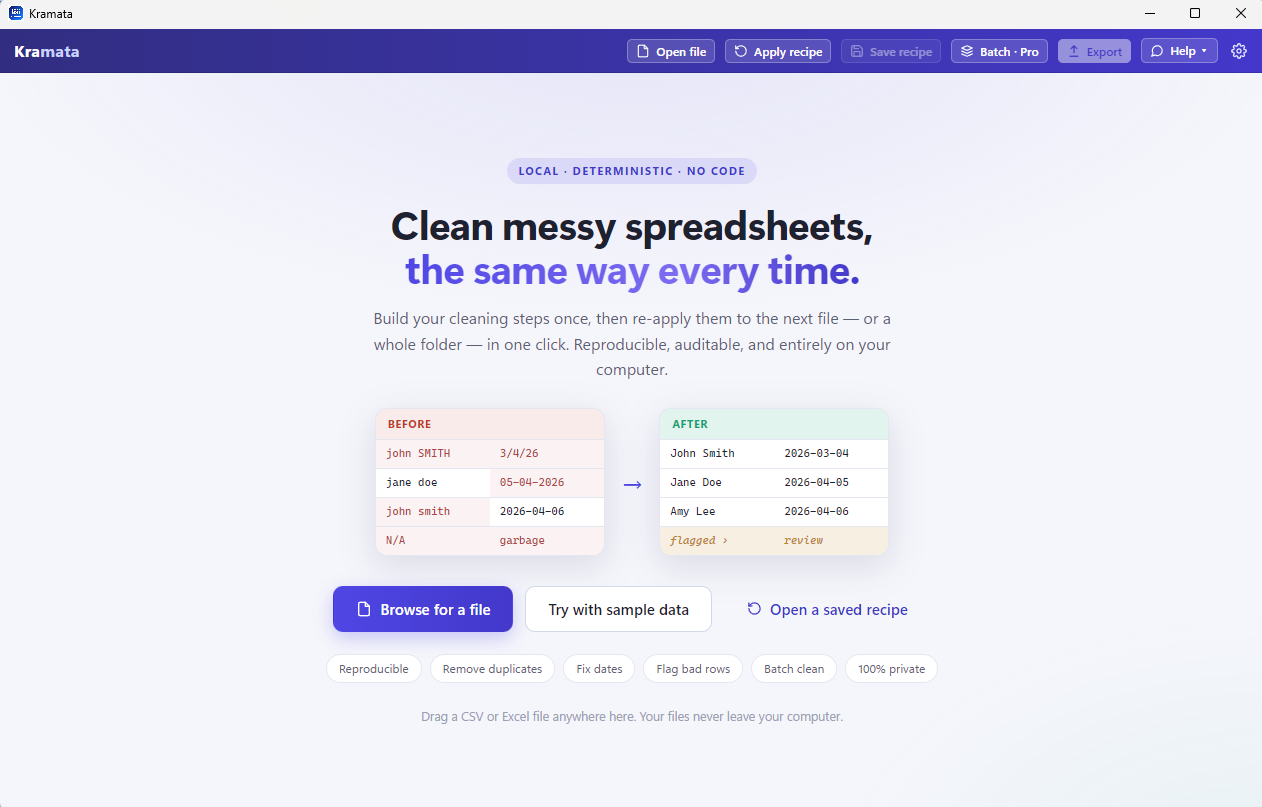
CSV or Excel. Kramata figures out the columns, even messy multi-row headers.

2

Add cleaning steps

Remove duplicates, fix dates, trim spaces, split columns, flag bad rows — see the result update live.

3

Save the recipe

Next month's file? Load it, click once, done. Identical results, every time.

Power tools that make Excel hurt — without the formulas

Merge two spreadsheets

Pull columns from a second file by matching a key — a reproducible VLOOKUP / XLOOKUP that never breaks. Keeps your row count: first match per key, no surprise duplicates.

Pivot & group

Group rows and total them (sum, count, average) — a pivot table you can re-run on every new file.

Unpivot (wide → long)

Fold month/category columns into tidy rows in one step — the transform Excel makes painful.

Calculated columns

Totals, differences, percentages, averages across columns — no formula language to learn.

Remove duplicates & fix dates

Dedupe on any columns, standardize messy date formats, trim spaces, fix case, fill blanks.

Flag bad rows

Rows that fail your checks go to a separate Flagged list to review & export — never silently dropped.

Batch over many files

Run your recipe across a whole folder at once — get back every file cleaned separately, or merged into one. Read the guide →

Reproducible

Same input + same recipe = byte-identical output. Build once, re-run forever. What's a recipe? →

Handles big files

An in-process database (DuckDB) means large CSVs load and scroll smoothly.

Kramata cleaning a spreadsheet with a recipe of steps

Replaces the spreadsheet chores you dread

If you do any of these by hand every week, Kramata turns them into a one-click, repeatable recipe.

VLOOKUP / XLOOKUP

Combine two spreadsheets by a common column — no broken formulas when columns move. Read the guide →

Pivot tables

Summaries that re-run themselves on next month's export.

Remove Duplicates

Non-destructive and repeatable — not a one-off button you re-run from scratch.

Text to Columns

Split and merge columns reliably, every time.

Fixing mixed date formats

Read every format and rewrite them one way — you tell it day-first or month-first, so 04/03 never gets guessed wrong.

Power Query

The repeatable-transforms power, in plain language — for everyone who opened Power Query once and closed it. It can stack a folder into one table; it can’t hand you back thirty clean files. Kramata does both. Read the guide →

Merge guides: merge multiple CSV files into one · combine and append CSV files · merge CSV files by column · merge by key without VLOOKUP

Go deeper: spreadsheet recipes · Excel workflow automation without VBA · automate monthly reports · batch process files · XLOOKUP alternative

Pricing

Simple and honest. The app is free; Pro unlocks unlimited batch processing.

Free

$0
  • All cleaning rules
  • Save & re-run recipes
  • Single-file cleaning
  • CSV & Excel export
Download

Your data never leaves your computer

Kramata processes everything locally. Your files — their names, contents, and every value — are never uploaded anywhere. No accounts, no cloud, no AI training on your data.

We collect only anonymous usage stats (like “app opened” or “an error happened”, never your files) to improve the app — and you can turn that off in Settings. Read our privacy details →

Download Kramata

Windows 10 & 11.

Free · Windows 10 & 11 · x64. The Microsoft Store is the easiest way in — one click, no security warnings, and the app updates itself automatically.
Prefer a direct download? Get the installer (.zip) — unzip and run it; Windows may warn the first time, so click More info → Run anyway. Or grab the .exe directly.